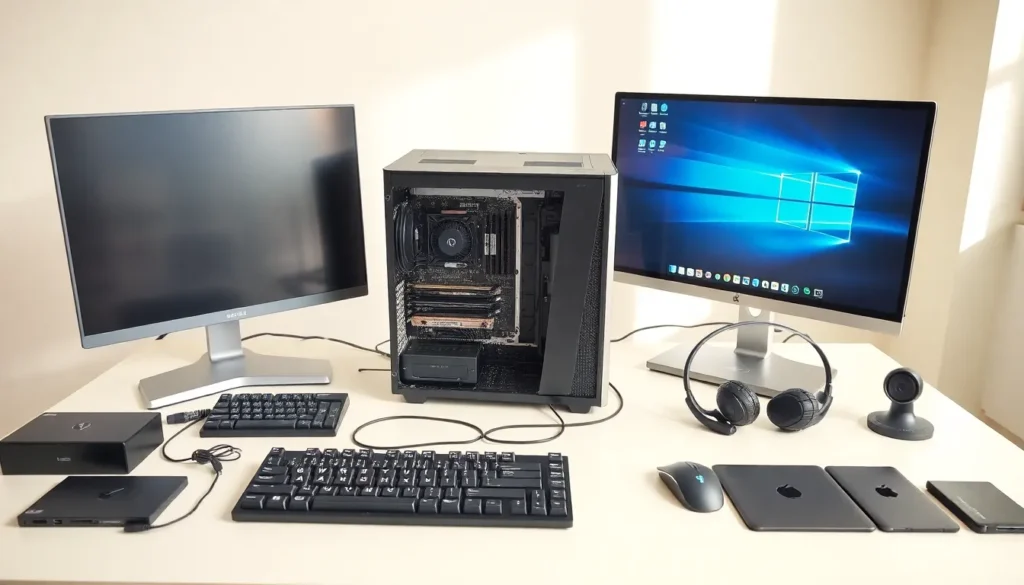
Table of Contents
ToggleHardware examples include every physical component that makes a computer work. From the processor inside a laptop to the keyboard on a desk, hardware forms the foundation of all computing systems. Understanding these components helps users make better purchasing decisions, troubleshoot problems, and appreciate how their devices function. This guide covers the most common hardware examples, breaking them into internal components and external devices. Whether someone is building a PC or simply curious about what’s inside their machine, this overview provides the essential information they need.
Key Takeaways
- Hardware examples include all physical computer components, divided into internal parts (CPU, RAM, storage) and external devices (keyboards, monitors, printers).
- The CPU acts as the computer’s brain, with popular hardware examples including Intel Core and AMD Ryzen processors that vary in core count and speed.
- RAM provides temporary fast-access memory, with 8GB suitable for general use and 16–32GB recommended for gaming and content creation.
- SSDs offer significantly faster performance than HDDs, making them ideal for operating systems and frequently used programs.
- Input devices like keyboards, mice, and webcams send commands to the computer, while output devices like monitors and speakers display results.
- Understanding hardware specifications helps users make smarter purchasing decisions and troubleshoot system issues effectively.
What Is Computer Hardware?
Computer hardware refers to all physical parts of a computing system. These components can be touched, seen, and physically replaced. Hardware differs from software, which consists of programs and instructions that run on physical devices.
Hardware examples fall into two main categories: internal and external. Internal hardware sits inside the computer case and handles core processing tasks. External hardware connects to the computer from outside and allows users to interact with the system.
Every computer requires certain hardware components to function. A desktop PC needs a processor, memory, storage, and a power supply at minimum. Laptops contain these same components in a compact form factor. Even smartphones and tablets rely on similar hardware principles, just in smaller packages.
The quality and specifications of hardware directly affect computer performance. A faster processor handles more calculations per second. More memory allows the system to run additional programs simultaneously. Better storage devices load files and applications more quickly. Understanding these relationships helps users choose hardware that matches their needs.
Internal Hardware Components
Internal hardware components perform the core work of computing. These parts sit inside the computer case, protected from dust and physical damage. They connect through cables, slots, and the motherboard, the main circuit board that links everything together.
Central Processing Unit (CPU)
The CPU serves as the brain of any computer. This chip executes instructions from software programs and coordinates activity between other hardware components. Modern CPUs contain billions of transistors and process billions of operations per second.
Popular CPU hardware examples include Intel Core processors and AMD Ryzen chips. Intel’s Core i5 and i7 lines handle everyday computing and gaming well. AMD’s Ryzen 5 and Ryzen 7 processors offer competitive performance at various price points. Both manufacturers release new generations regularly, each bringing speed improvements and efficiency gains.
CPU speed is measured in gigahertz (GHz), but raw speed doesn’t tell the whole story. Core count matters too, a CPU with eight cores can handle more simultaneous tasks than one with four cores. Cache size, architecture generation, and thermal efficiency all affect real-world performance.
Random Access Memory (RAM)
RAM provides temporary storage for data the CPU needs right now. When someone opens a web browser or launches a game, those programs load from storage into RAM for faster access. More RAM means the system can keep more programs active without slowing down.
Common RAM hardware examples include DDR4 and DDR5 memory modules. DDR4 remains widespread in current systems, while DDR5 offers higher speeds and appears in newer builds. Most desktop computers use DIMM sticks, while laptops use smaller SO-DIMM modules.
RAM capacity ranges from 4GB in budget devices to 64GB or more in workstations. For general use, 8GB works adequately. Gamers and content creators benefit from 16GB or 32GB. The RAM operates at different speeds, typically ranging from 2400MHz to 6000MHz or higher.
Storage Devices
Storage devices hold all files, programs, and the operating system permanently. Unlike RAM, storage retains data when the computer powers off. Two main types dominate the market: hard disk drives (HDDs) and solid-state drives (SSDs).
HDDs use spinning magnetic platters to store data. They offer large capacities at low prices, 4TB drives cost under $100. But, they read and write data more slowly than SSDs and contain moving parts that can fail.
SSDs store data on flash memory chips with no moving parts. They boot operating systems in seconds rather than minutes and load applications almost instantly. NVMe SSDs connect directly to the motherboard and deliver the fastest speeds available. SATA SSDs use older connections but still outperform HDDs significantly.
Many users combine both storage types. An SSD holds the operating system and frequently used programs, while an HDD stores large media files and backups.
External Hardware Devices
External hardware devices connect to the computer from outside the case. These peripherals allow users to input commands, view output, and expand system capabilities. Most connect through USB ports, though wireless options have become increasingly popular.
Input Devices
Input devices send data and commands into the computer. They translate physical actions, pressing keys, moving a mouse, speaking, into digital signals the system understands.
The keyboard remains the most common input device. Standard keyboards feature around 104 keys, including letters, numbers, and function keys. Mechanical keyboards use individual switches under each key and appeal to gamers and typists who prefer tactile feedback. Membrane keyboards cost less and operate more quietly.
Mice provide point-and-click control over graphical interfaces. Optical mice use LED sensors to track movement, while laser mice offer higher precision. Gaming mice add extra buttons and adjustable sensitivity settings. Trackpads serve the same function on laptops, though many users connect external mice for extended work sessions.
Other input hardware examples include:
- Webcams for video calls and streaming
- Microphones for voice input and recording
- Scanners that digitize physical documents
- Game controllers for console-style gaming on PC
- Graphics tablets used by digital artists
Output Devices
Output devices display or produce results from the computer. They convert digital data into forms humans can see, hear, or use.
Monitors display visual output from the computer. Screen sizes range from 21 inches for basic use to 32 inches or larger for productivity and gaming. Resolution matters too, 1080p (Full HD) suits general use, while 4K displays show sharper detail for creative work. Refresh rates of 144Hz or higher benefit gamers who need smooth motion.
Speakers and headphones produce audio output. Built-in laptop speakers work for basic needs, but external speakers deliver better sound quality. Headphones provide private listening and often include microphones for communication.
Printers create physical copies of digital documents. Inkjet printers handle photos and color documents well. Laser printers produce text documents faster and cost less per page over time. Many modern printers include scanning and copying functions.